Live Employee Location Tracking That Keeps Teams Connected

Effortless employee location tracking to stay connected with your on-site and remote teams, improve field visibility, and manage operations confidently.

Live employee location tracking for better team connection and field visibility
Trusted by 1500+ Companies Worldwide
127+
Countries
1500+
Companies
100K+
Users
2.5M+
Insights Generated

Powerful Employee Location Tracking for Distributed and Field Teams

Real-time live location tracking on a map view
live location icon

Live Location Updates

See exactly where your field and remote team members are during work hours. Real-time GPS updates let managers stay connected without micromanaging or chasing status messages.

auto check-in icon

Geofencing & Auto Check-Ins

Draw virtual perimeters around offices, client sites, or job zones. Employees are checked in and out automatically the moment they cross a geofence — no manual punching, no forgotten clock-ins.

route history icon

Route History & Travel Logs

Replay the full day’s route for any field employee, with timestamps for every stop. Useful for billing, dispute resolution, and spotting inefficient travel patterns.

onsite verification icon

Visit Verification with Timestamps

Get reliable proof of when employees arrived at a customer site, how long they stayed, and when they left. Perfect for service contracts, audits, and client-facing reporting.

Interactive map view of all employees in real time
map view icon

Interactive Map View

See your whole team on a single live map. Zoom in on a region, filter by team or shift, and instantly understand where work is happening across cities, sites, and territories.

live status icon

Live Status Indicators

Each employee on the map shows real-time status — actively working, on break, idle, or offline. Spot delays and reassign tasks before they impact the day.

productivity icon

Location-Based Productivity

Tie productivity data to where work actually happens. Compare on-site vs. travel time, measure output per location, and identify your most efficient teams and routes.

cross device icon

Mobile + Desktop Sync

Track location from the Time Champ mobile app for field crews and from the desktop agent for office staff — all unified in one workspace, so managers see everyone in one place.

Configurable geofence zones around job sites
geofence zones icon

Configurable Geofence Zones

Define geofences of any size or shape — a single building, a parking lot, a service territory. Set different rules per zone and per team so the platform matches how your operation really runs.

auto site check-in icon

Automatic Site Check-Ins

Once a zone is set, Time Champ handles the rest. Employees crossing into a job site are clocked in automatically; leaving the zone clocks them out. No app to open, no friction.

movement alert icon

Unauthorized Movement Alerts

Get a notification the moment someone enters a restricted area or leaves a site during scheduled hours. Catch issues in real time instead of finding them in a report a week later.

audit-ready report icon

Audit-Ready Location Reports

Export clean, timestamped location reports for payroll disputes, client audits, or compliance checks. Every entry is sourced from GPS data, so there’s nothing to question.

Traditional Location Tracking vs. Time Champ Location Tracking

A quick look at how Time Champ transforms the way teams track field activity, site visits, and on-the-ground performance:

Traditional Location Tracking

  • manual check-in icon
    Manual check-ins by phone or text from the field
  • no visibility icon
    No real-time visibility into where field teams are
  • no geofencing icon
    No geofencing or zone-based automation
  • paper logs icon
    Paper or spreadsheet visit logs that go missing
  • no route history icon
    No route history, no travel proof when disputed
  • no audit trail icon
    Limited reporting for compliance and audits

Modern Location Tracking
( Time Champ )

  • real-time map icon
    Real-time GPS location with live map view across teams
  • auto geofence icon
    Automatic geofenced check-ins and check-outs at every site
  • route history icon
    Complete route history with timestamps for every stop
  • site verification icon
    Site verification with GPS-stamped arrivals and departures
  • cross-platform icon
    Mobile and desktop tracking unified in one workspace
  • audit-ready icon
    Audit-ready location reports with full compliance trail

Is Time Champ the Right Location Tracking Software for Your Team?thinking image

Absolutely. Teams using Time Champ gain complete visibility into where work is happening, stronger field accountability, and a single live workspace for both office and on-field staff.

It helps operations leaders coordinate distributed teams, verify site visits, and run daily field activity with confidence.

With Time Champ, teams:

Time Champ employee location tracking dashboard preview
Live field visibility icon

Gained Live Field Visibility

They saw where every team member was in real time, removing guesswork and the back-and-forth of status calls during the workday.

Auto check-in icon

Automated Site Check-Ins

Geofenced zones handled arrivals and departures automatically, so employees never had to remember to punch in or out at a site.

Route history icon

Captured Reliable Route History

Every route was recorded with timestamps, giving managers clean travel data for billing, dispute resolution, and smarter scheduling.

Bring your distributed team into one live workspace with Time Champ — the location tracking platform built for field visibility, site verification, and smoother daily operations.

Bring your workflow to our platform. We’ll bring the precision behind every second.

Get Started now!
How Time Champ’s Location Tracking Works
  • 1
    Create Your Account
  • 2
    Enable Location Settings
  • 3
    Define Geofence Zones & Rules
  • 4
    Track Locations in Real Time
  • 5 Review & Export Location Reports
Create Your Account

Start by signing up for free and setting up your Time Champ workspace in just a few minutes — no card needed for the trial.

Create your Time Champ account
Enable Location Settings

Turn on location tracking for the users and teams who need it. Employees get a clear notice that tracking is active, and you stay fully transparent with your workforce.
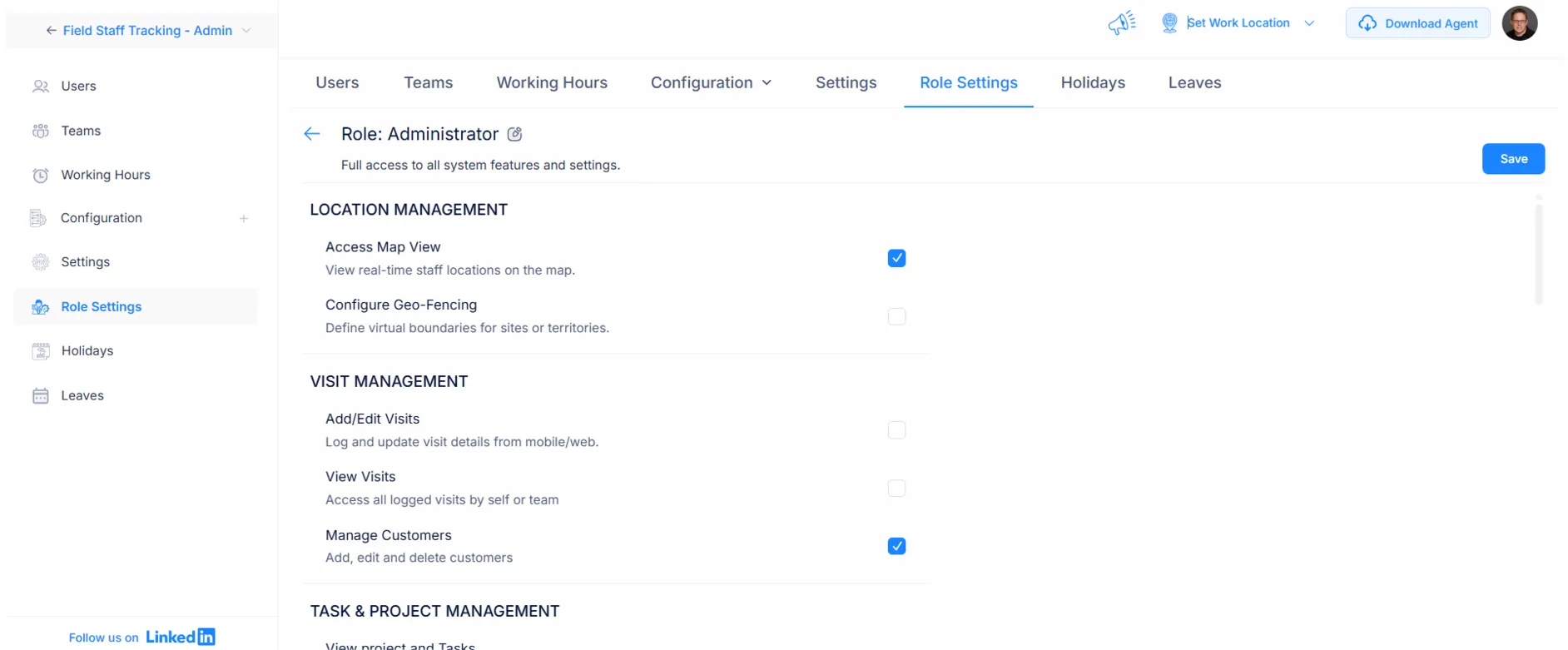
Enable location tracking settings for users
Define Geofence Zones & Rules

Draw geofences around offices, job sites, or client locations. Set check-in rules, working hours, and alerts that match how each team actually operates.

Define geofence zones and tracking rules
Track Locations in Real Time

Time Champ captures live GPS positions, route history, and entry/exit events automatically during work hours — no buttons to press, no logs to fill.

Automatic real-time location tracking on map
Review & Export Location Reports

Review live maps, route trails, visit summaries, and exception alerts. Export clean, timestamped reports for payroll, billing, or compliance whenever you need them.

Review and export location tracking reports

Employee Location Tracking Use Cases

Real-time location monitoring icon

Real-Time Location Monitoring

Geofencing and auto check-in icon

Geofencing & Auto Check-Ins

Route history icon

Route History & Travel Logs

Site visit verification icon

Site Visit Verification with Timestamps

Field dispatching icon

Field Service Dispatching & Coordination

On-site attendance icon

On-Site Attendance Validation

Movement alerts icon

Unauthorized Movement Alerts

Lone worker safety icon

Safety Tracking for Lone or Remote Workers

Audit-ready report icon

Audit-Ready Location Reports for Compliance

A Smarter Location Tracking Tool for Better Field Visibility

See What Our Happy Customers Say

Agilisium
Saw 70% Boost in Workforce Productivity
Automated, accurate attendance eliminated manual effort.
Smarter efficiency reduced operational delays
Agilisium companylogo

Simply awesome! If you have suggestions, Time Champ is always open to your ideas, share your thoughts, and help shape what comes next.

Agilisium
Vserve Ebusiness Solutions
52% Rise in Employee Accountability
Improved visibility into team operations
Saw a 56% increase in overall team productivity
Vserve Ebusiness Solutions

Time Champ redefined our daily operations. It has simplified how we track staff and manage daily operations. Weʼve seen real results in productivity and accountability. Iʼd recommend it to any business looking for an easy, all-in-one solution

Arun Raj
Envision
Saw 47% Improvement in Work Quality
Reduced effort and time in payroll processing
Achieved better task prioritization across teams
Envision

We replaced a tool that fell short with Time Champ, and our operations improved instantly. Its flexible tracking, attendance, productivity, and screenshots made our workflow far more efficient.

Sharat Kumar,
Process Analyst at Envision Enterprise Solutions
Markets & Markets
Saw 25% Boost in Team Productivity
Stronger field accountability with smarter location tracking
Achieved a 38% boost in operational efficiency
Markets & Markets

Time Champ has transformed how we manage our workforce. With real-time monitoring and deep insights, we’ve reduced inefficiencies, improved productivity, and supported healthier work-life balance, all without compromising employee privacy.

Markets and Markets
Milestone Technologies
Saved up to 1,270 Accuracy in Billing Hours
Achieved better accuracy and efficiency in client billing  
Improved scheduling that enhanced overall productivity 
Milestone Technologies

Time Champ is a trusted buddy for us. We have been using it for 3 years now, and it has greatly helped us streamline our operations.  

Premish Paul,
 Executive Leader at Milestone Technologies
 AAA Insolvency
Achieved 46%Enhancement in Workflow Efficiency
Improved monitoring through real-time insights
39% increase in employee productivity
 AAA Insolvency

Time Champ showed how time is spent, boosted team productivity, simplified billing, and improved performance with its easy-to-use, clear system.

Priyanka Mazoomdar
See What Makes Teams Choose Time Champ

Recognized for Excellence, Trusted by Teams Worldwide

Time Champ’s earns top ratings for helping teams work smarter with clarity, focus, and measurable growth.

gridleader award timechamp high perfomer timechamp spring momentum awards timechamp easier todo award asia high perfomer spring mid market high perfomer high perfoemr small high user adoption awards timechamp awards regional leader timechamp asia pasific leader easiestsetup timechamp high perfoemr small high perfomer timechamp midmarket leader mid market high perfomer high perfomer timechamp mid market high perfomer
stars image
g2 Logo stars image

4.8

capterra logo stars image

5.0

crozdesk logo stars image

5.0

softwaresuggest logo stars image

5.0

A Complete Guide to Employee Location Tracking with Time Champ

Guide Topics

    What is Employee Location Tracking?
    Employee location tracking is the practice of using GPS, geofencing, and connected devices to record where employees are during work hours. It gives managers a real-time map view of their field, hybrid, or distributed teams, along with route history, site visits, and check-in records they can rely on for payroll, billing, safety, and compliance.
    Why is Employee Location Tracking Important?
    Location tracking matters because most distributed teams operate without a clear picture of where work is actually happening. The points below highlight why employee location tracking has become an essential part of modern field operations.
    Improves Visibility Across the Field
    When teams work across multiple sites, managers often rely on phone calls and status messages to know where everyone is. Location tracking removes that friction by giving you a single live map of your workforce, so you spend less time chasing updates and more time supporting your team.
    Strengthens Accountability Without Micromanagement
    Knowing that arrivals, departures, and site visits are logged automatically encourages employees to stay on schedule. Managers don’t need to hover, and employees don’t need to constantly check in — the data speaks for itself.
    Backs Up Billing and Service Contracts
    If you bill clients based on time-on-site or service visits, GPS-stamped arrivals and departures become reliable proof of work. They reduce disputes, support cleaner invoices, and make it easy to defend hours when a customer asks for detail.
    Supports Safer Lone-Worker Operations
    For workers who travel alone or work in remote areas, knowing their location is a safety feature. If something goes wrong, you can identify exactly where they are without guessing, and routes can be replayed if an incident needs to be investigated.
    Helps Schedule and Route Smarter
    When you can see real movement patterns — not assumed ones — you can plan jobs around actual travel time, balance workloads across territories, and route the closest available technician to a new request.
    Creates a Reliable Compliance Record
    Many industries require proof of presence, visit duration, or service completion. A timestamped location trail gives you an audit-ready record without anyone having to fill out paperwork after the fact.
    How Time Champ Supports Location Tracking
    Time Champ’s location tracking is built to feel invisible to employees and clear to managers. Once it’s set up, it runs in the background and surfaces what you need, when you need it.
    Real-Time GPS & Map View
    See every active employee on a single live map. Filter by team, shift, or region, and zoom in to a specific site to understand who is where right now.
    Geofencing & Auto Check-Ins
    Draw geofences around any location — an office, a client site, a warehouse, a service zone. Employees are automatically checked in when they arrive and checked out when they leave, with no manual punching.
    Route History & Travel Logs
    Every route is recorded with timestamps, so you can replay a workday in detail. This helps with billing accuracy, dispute resolution, and identifying inefficient travel patterns over time.
    Visit Verification & Timestamps
    Each customer site visit comes with arrival, departure, and duration data. You get clean proof of service that can be exported into reports for clients or compliance teams.
    Location-Based Productivity Reports
    Connect location data to productivity output. Compare how much work gets done on-site vs. in transit, and identify which territories or shift patterns deliver the best results.
    Cross-Platform Tracking — Mobile and Desktop
    Field teams track from the mobile app, office staff from the desktop agent, and managers see everyone in one unified workspace — no juggling tools or syncing spreadsheets.
    Privacy & Consent Controls
    Tracking only runs during scheduled work hours. Employees see when it’s active, admins can set role-based access, and retention rules let you comply with local data regulations.
    Key Features of Location Tracking Software
    Not all location tracking tools are built the same. The features below are the ones that separate basic GPS apps from a platform you can run an operation on.
    Live Location Updates
    Continuous GPS positioning during work hours, refreshed often enough that the map reflects real movement and not stale data from an hour ago.
    Geofencing & Zone-Based Rules
    The ability to define virtual perimeters around any site and attach rules to them — auto check-in, alerts, working-hour restrictions, or specific approval workflows per zone.
    Route History & Movement Trails
    A full breadcrumb trail of where employees went during the day, with timestamps for each segment. Useful for dispute resolution, route optimization, and proof of work.
    Smart Alerts and Notifications
    Triggers for unauthorized movement, late arrivals, missed check-ins, or extended idle time at a location, so issues are caught in real time rather than during a weekly review.
    Visit Logs and Site Verification
    Automatic logging of every site visit, with arrival, departure, and total time on site. Each entry is GPS-sourced, so there’s nothing to manually fill in or forget.
    Reports and Audit Trails
    Exportable location reports for payroll, billing, compliance audits, or internal reviews — with the raw data backing every number.
    Cross-Device Support
    Coverage across iOS, Android, and desktop, with consistent tracking behaviour regardless of which device an employee uses on a given day.
    Benefits of Using Location Tracking Software
    The right location tracking system pays back across operations, finance, safety, and customer experience. Here are the gains teams see most often after they roll it out.
    1. Real Visibility into Daily Field Activity
    Managers stop relying on guesswork and second-hand reports. The map shows who is on-site, who is en route, and who is delayed — in real time, across every territory you cover.
    2. Cleaner Payroll and Client Billing
    Hours and visits are sourced from GPS data instead of manual entry, which dramatically reduces payroll disputes and gives finance teams cleaner data to invoice from.
    3. Better Customer Service and Faster Response
    When a new job comes in, you can dispatch the closest available technician based on actual location instead of who you assume is nearby — cutting response times and improving satisfaction.
    4. Stronger Employee Safety
    For lone workers and field crews, knowing their position is part of the duty of care. If a check-in is missed or someone goes off-route, you can respond fast instead of finding out hours later.
    5. Lower Administrative Overhead
    Auto-generated location reports replace daily activity logs, paper visit sheets, and follow-up emails. The team spends less time on paperwork and more time on actual work.
    Challenges without Employee Location Tracking
    Running a distributed or field-based team without location tracking creates real cost and risk — it just shows up in places that are easy to miss until it’s already hurting the business.
    Blind Spots in Daily Operations
    Without live visibility, managers depend on what employees report back. Honest mistakes, delayed updates, or miscommunication can lead to scheduling problems, missed jobs, and frustrated customers.
    Billing Disputes and Lost Revenue
    When a client questions an invoice for on-site time, you have nothing to back it up except the technician’s own log. That often leads to write-offs and erodes trust over time.
    Inefficient Routing and Wasted Travel
    Without route data, you can’t see which trips are unnecessarily long, where teams are doubling back, or how to redistribute work geographically. Fuel, time, and morale all take the hit.
    Compliance and Audit Gaps
    Many service contracts and regulatory frameworks require proof of presence. If you can’t produce GPS-stamped records on demand, you may lose contracts or face penalties.
    Slower Incident Response
    If something happens to a lone worker, the absence of live location data turns a quick response into a search. That’s a safety risk you don’t need to carry.
    Best Practices for Employee Location Tracking
    Location tracking only works well when it’s introduced and managed thoughtfully. These are the habits that separate teams who get real value from teams who just install a tool.
    Be Transparent About What You’re Tracking
    Tell your team exactly what is being recorded, when, and why. Trust is the foundation; secrecy guarantees pushback and poor adoption.
    Track Only During Scheduled Work Hours
    Limit tracking to working hours and respect off-duty time. This is both a legal best practice in many regions and a clear signal that the tool exists to support work, not to monitor people’s lives.
    Define Geofences Around Real Operational Needs
    Don’t set up zones for the sake of it. Start with your highest-impact sites — client offices, busy job sites, warehouses — and expand once teams are comfortable with how the rules behave.
    Review Location Data Regularly
    Set a simple weekly or monthly cadence to review reports. Look for patterns — recurring delays, inefficient routes, or sites where check-ins frequently fail — and use them to improve scheduling.
    Use the Data to Support, Not Punish
    Treat the data as a coaching tool. Recognize teams that consistently show strong on-site presence and use anomalies as conversation starters, not as evidence in a disciplinary action.
    Integrate With Your Other Systems
    Location data is most useful when it flows into payroll, billing, dispatch, and CRM systems. The fewer manual handoffs you have, the more reliable your numbers become.
    Set Clear Location Tracking Policies
    Before rolling out location tracking, document a short, plain-language policy that covers what is tracked, when, by whom, where the data is stored, and how long it’s retained. Share it with everyone, get acknowledgements, and review it annually. This is the single most important step to keep your program both compliant and trusted across the team.
    capteraa small logo goolereview small logo g2crowd small logo crozdesk small logo companyreviewsmall logo
    star image 4.7/5 avg.

    Ready to Manage Your Workforce Smarter?

    Join our family of 1500+ companies using smart insights to redefine workforces!

    tick mark indicating free trial available

    Free Trial

    tick mark indicating no credit card required

    No Credit Card Required